Using Zowe API ML Single Sign On


 Twitter
 LinkedIn
 Facebook
 Email
EmailUsing Zowe API ML Single Sign On
You can extend Zowe and utilize Zowe Single Sign On (SSO) provided by Zowe API Mediation Layer (API ML) to enhance system security and improve the user experience.
Zowe Single Sign On (SSO) allows a user to authenticate once and access multiple z/OS services through API Mediation Layer. Upon authentication, ZAAS (Zowe Authentication and Authorization Service) issues an access token that represents the user's identity. This token can be reused across all services that participate in SSO, so the user does not need to re-enter credentials for each service.
In other words, after initial log-in with your mainframe credentials, Zowe gives you a token that is accepted by any service through the API Gateway which is used to verify your identity.
Currently, API ML can provide SSO only in a single security domain.
The following diagram illustrates the interactions between the general participants in the single sign on process.
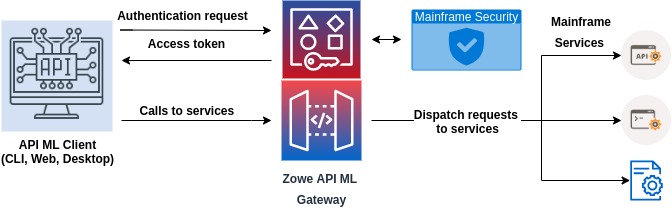
There are two main types of components that participate in Zowe SSO through API ML:
-
Zowe API ML client
- This type of component is user-facing and can obtain user credentials through a user interface (web, CLI, desktop).
- A Zowe API ML client calls API services through API ML.
- An example of such clients are Zowe CLI or Zowe Desktop.
-
API service accessed via Zowe API ML
- A service that is registered to API ML and is accessed through the API ML Gateway.
- Services are protected by an access token or PassTicket.
- The access token or PassTicket can be validated by the called API service.
The following sections describe what is necessary to utilize SSO for both types of components.
Zowe API ML client
- The Zowe API ML client needs to obtain an access token via the
/loginendpoint of ZAAS by providing z/OS credentials. - A client can call the ZAAS
/queryendpoint to validate the token and get information from the token. This is useful when the API client has the token but does not store the associated data such as the user ID. - The API client needs to provide the access token to API services in the form of a Secure HttpOnly cookie with the name
apimlAuthenticationToken, or in theAuthorization: BearerHTTP header as described in Authenticated Request.
API service accessed via Zowe API ML
This section describes the requirements that an API service needs to satisfy to adopt a Zowe SSO access token.
- The token received by the API ML Gateway is first validated and then may be passed directly to the service. Alternatively, the API ML Gateway can exchange the token for a PassTicket if the API service is configured to expect a PassTicket.
- The API service should validate the token. It can use ZAAS Client or directly call the
queryendpoint. - The API service can extract information about the user ID by calling the ZAAS
/queryendpoint. - The alternative is to validate the signature of the JWT token using the public key of the token issuer (e.g. the API ML Gateway). The API service needs to have the API ML Gateway certificate along with the full CA certification chain in the API service truststore.
The REST API of ZAAS can easily be called from a Java application using the ZAAS Client.
Existing services that cannot be modified
If you have a service that cannot be changed to adopt the Zowe authentication token, the service can utilize Zowe SSO if the API service is able to handle PassTickets.
For more information, see Enabling single sign on for extending services via PassTicket configuration.